


Tow truck software: the call, the kilometres and the photos in one job
Every call with an address, kilometres and profit
Where to pick up, where to take it, what it costs. The driver sees the call on the phone and taps "On my way", and the client knows right away that the truck is coming.
After you sign up, you get a filled-in example of a towing business: services, prices and calls are already inside.
Example with demo data
No long learning needed
Four short steps and you are in a ready cabinet. No long manuals.
- No need to learnClear from the first use: big buttons, simple words.
- We filled it in for youThe services of your business are already in the app. We add prices as an example, you change them to yours.
- The choice is yoursYou can pick "Set it up for me" or "I'll set it up". You can change this at any time.
- See how it works at onceAfter signing up you get a cabinet with a sample order for your kind of business.
You can switch anytime
It's a sample. Change them to yours — or leave them and adjust later.
Example with demo data
The driver’s whole day on one screen
The driver’s calls in order, with travel time between them. If trips are too close together, the program warns you.
- Every driver has their own route
- The whole day in one Google Maps link
- You set the travel buffer between calls in minutes
Example with demo data
Tap "On my way" and the client relaxes
The client stops calling to ask "where are you?". They see the truck is on the way and get a message.
- Departure time is saved in the order
- The message goes out by itself, you can edit the text
- The client sees the route "from → to"
Example with demo data
The profit of every call, not "I guess we made something"
The call price, the driver’s pay and a share of overheads (fuel, ads). At the end you see what is left for you.
- Driver gets a percentage or a fixed sum per call
- Payment: cash, card or transfer
- Cash and profit in one place
Call · Skoda Octavia
- Tow truck call-out
- $100
- Tow truck per km · 25 km × $3
- $75
- Wheels locked
- $60
- Driver, 30%
- − $70.50
- Share of overheads
- − $20
Paid: card · $235
Example with demo data
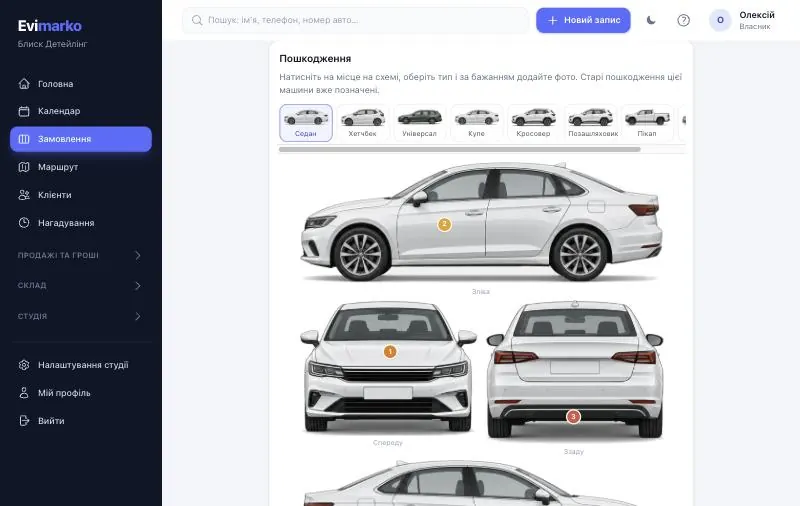
The "scratch after towing" argument ends before it starts
Every service has steps: photos of the car before loading, securing on the platform, odometer at the start and finish, photos after unloading.
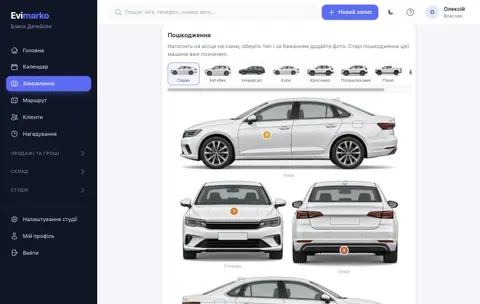
- Damage is marked on the car diagram
- The client signs the report with a finger on the spot
- They get the link to the report right away
Clients call a tow truck themselves, even at night
The bot asks what is needed, where the car is, where to take it and roughly how many kilometres. All that is left for you is to accept the order.
- The address can be typed or sent as a location
- The bot asks "where to tow" on its own
- It answers at night while you are driving
Example with demo data
Your own website in one evening
Pick the blocks: services and prices come from the app. No programmer needed.
- Reorder blocks by dragging
- The price list is always current: it comes from the CRM
- The "Book" button leads to online booking
Example with demo data
All customer conversations in one place
Telegram, Viber and the website chat are in one feed. "Car is ready" and reminders go out from a template.
- Telegram, Viber and website chat in one app
- Templates: booking confirmed, reminder, "Car is ready"
- You need your own account in each service
Example with demo data
Everything for a towing business
Ready price list
Call-out, kilometres, night rate, waiting "per 15 minutes", locked wheels and motorcycle are already in the list. You set your own prices.
Kilometres as a number
Type the kilometres into the "per km" service and the total updates. The "route and km in Google Maps" link helps with the number.
No bays
Business type "on-site": a call is tied to an address, not to a bay or a spot.
Report and photos
Photos before loading, damage diagram, client signature.
Driver pay
A percentage or a fixed sum per call. Counted from completed orders.
Repeat calls
Reminders for clients and the full history of calls for every car.
What changes when calls stop living in a notebook
| Notebook | Excel | Evimarko | |
|---|---|---|---|
| Call address | Written on a scrap, lost | A table row, "tow to" in a note | From and to in the order, route in Google Maps |
| Driver’s route | You dictate by phone | A list with no order or time | The day’s calls in order, travel time |
| Price per km and night | Worked out on a calculator | Formulas that break | Call-out, km and surcharges as order lines |
| The scratch argument | Word against word | Nothing to show | Photos before loading, signed report |
| Profit and pay | Counted at month end | Formulas and mistakes | Counted for every call automatically |
| What the client sees | Calls: "where are you?" | Nothing | Status "on the way" and a message |
Call address
Notebook: Written on a scrap, lost
Excel: A table row, "tow to" in a note
Evimarko: From and to in the order, route in Google Maps
Driver’s route
Notebook: You dictate by phone
Excel: A list with no order or time
Evimarko: The day’s calls in order, travel time
Price per km and night
Notebook: Worked out on a calculator
Excel: Formulas that break
Evimarko: Call-out, km and surcharges as order lines
The scratch argument
Notebook: Word against word
Excel: Nothing to show
Evimarko: Photos before loading, signed report
Profit and pay
Notebook: Counted at month end
Excel: Formulas and mistakes
Evimarko: Counted for every call automatically
What the client sees
Notebook: Calls: "where are you?"
Excel: Nothing
Evimarko: Status "on the way" and a message
From sign-up to the first call
Pick "Towing"
You say once what you do. The rest fills in by itself.
The price list is ready
Services are ticked, prices are set as an example. Change them to yours.
Add drivers
Each one sees their own calls and the day’s route.
Take the first call
Address, where to tow, price. The program guides you from there.
Priced by team size
Everything for work is open on every plan. Team size, integrations and support differ. The first 14 days are free.
Solo
$12.00 / per month
- 1 person — just you
- Everything for work — no limits
- Booking, calendar, signed check-in, photos
- Stock, film, profit of every car
- AI assistant in every plan: 1,000 messages a month
- Hired a tech? Switch to “Start” in one click
Start
$29.00 / per month
- Up to 3 staff
- Everything you need — no limits
- Booking, calendar, signed check-in, photos, checklists
- Client link: status, findings with photos, approval, payment
- Stock, film, materials, suppliers
- Pay per service, profit per car
- AI assistant in every plan: 1,000 messages a month
Business
$49.00 / per month
- Up to 10 staff
- Everything in Start
- Fast support on Telegram
- For businesses with several technicians and bays
Pro
$79.00 / per month
- Unlimited staff
- Everything in Business
- Accounting export and fiscal receipts
- IP telephony, connection to other apps (Zapier, Make, n8n)
- Priority support
- We migrate your data from Excel / other CRMs for you
There is a separate plan for a large network. Write to us and we will talk.
No surprises
No auto-charges
You pay once for the period you choose. We do not ask for a card at sign-up.
Your data stays
If access ends, the program becomes view-only and everything is kept.
Export to Excel
The owner downloads the whole database as one archive, tables open in Excel.
A copy every night
A backup of your data is made automatically every night.
What the program does not do
There is no GPS tracking of the truck: the program does not show where the car is now. The client sees the status "on the way", not a dot on a map.
Distance is not measured automatically: kilometres are typed in as a number, and the Google Maps route link helps with the figure.
Connects to what you already use
Card payments through Stripe
The client pays the invoice online, the money goes to your Stripe.
Telegram, Viber and website chat
Conversations with clients are collected in one feed.
Telephony, API and webhooks
Calls are matched to the client, data goes to your own services. Pro plan.
Questions from tow truck owners
How do I charge for towing per kilometre?
The call-out in town is a separate line with a fixed price. Driving out of town is the service "Tow truck (per km)": the price is for 1 km, and you type the kilometres into the order. The odometer at the start and finish is in the service steps, so the number is easy to check.
Can I record where to pick up and where to tow?
Yes. The order has two fields: "pick-up (where the car is)" and "tow to". The client sees them as "from → to" on the order page, and so does the driver in the route.
We charge more at night and on weekends. How do I handle that?
There is a service called "Night or weekend rate (surcharge)". Add it to the order and it goes in as a separate line, so the client understands what they pay for.
We have several trucks and drivers.
Each driver has their own calls and their own route for the day. You count the driver’s pay as a percentage or a fixed sum per call.
Do I need bays and spots?
No. For an on-site business the order is tied to an address and does not take a bay. If you also have a yard, you can work both ways.
Can I track the truck on a map?
No. The client sees the status "on the way" and gets a message when the driver taps "On my way". The program does not show a point on a map.
The client says the scratch appeared after towing.
Before loading, the driver photographs the car and marks damage on the car diagram, and the client signs the report. They get the link to the report right away.
Does it work from the driver’s phone?
Yes. The program opens in the phone browser: the driver sees their calls, the route and the "On my way" button, and can add photos.
Can a client call a tow truck on their own?
Yes, through the booking page or the Telegram bot. The bot asks for the address, where to tow and roughly how many kilometres.
How much does the program cost?
The Solo plan for one person costs $12.00 per month, Start for up to 3 people is $29.00. The first 14 days are free, no card needed.
What happens to my data if I stop paying?
There are no auto-charges. When access ends, the program becomes view-only and your data is kept. You can export the whole database to Excel.
Other niches and useful pages
The first car booked in one evening
Create your studio
Name, services from a ready list, your prices.
Add technicians
Everyone sees only their own work.
Book the first car
Then the app tells you what to do next.
Try it in your own studio
The first week will show how much you really earn on every car.
No card needed · Works on computer and phone